The same website can look quite different on a wide monitor and a phone. A desktop page can display several categories beside one another, while a smaller screen needs a different arrangement. Comparing those layouts is useful when the purpose is to find information. It is less useful when a screenshot is treated as proof of a feature that was never opened.
This guide compares the supplied AB33 desktop homepage with the original mobile reference. They are separate captures, not a simultaneous compatibility test. The AB33 homepage is the starting destination associated with the images. Menu visibility, account controls and available space are the focus; payment performance and completed member actions were not tested.
Begin with the purpose of the screen
Before comparing colours or button positions, identify the page’s job. A homepage introduces categories and other routes. A sign-in page asks an existing account holder to establish a session. A promotional listing presents offers that require their own explanation. Similar branding does not turn those pages into the same kind of information.
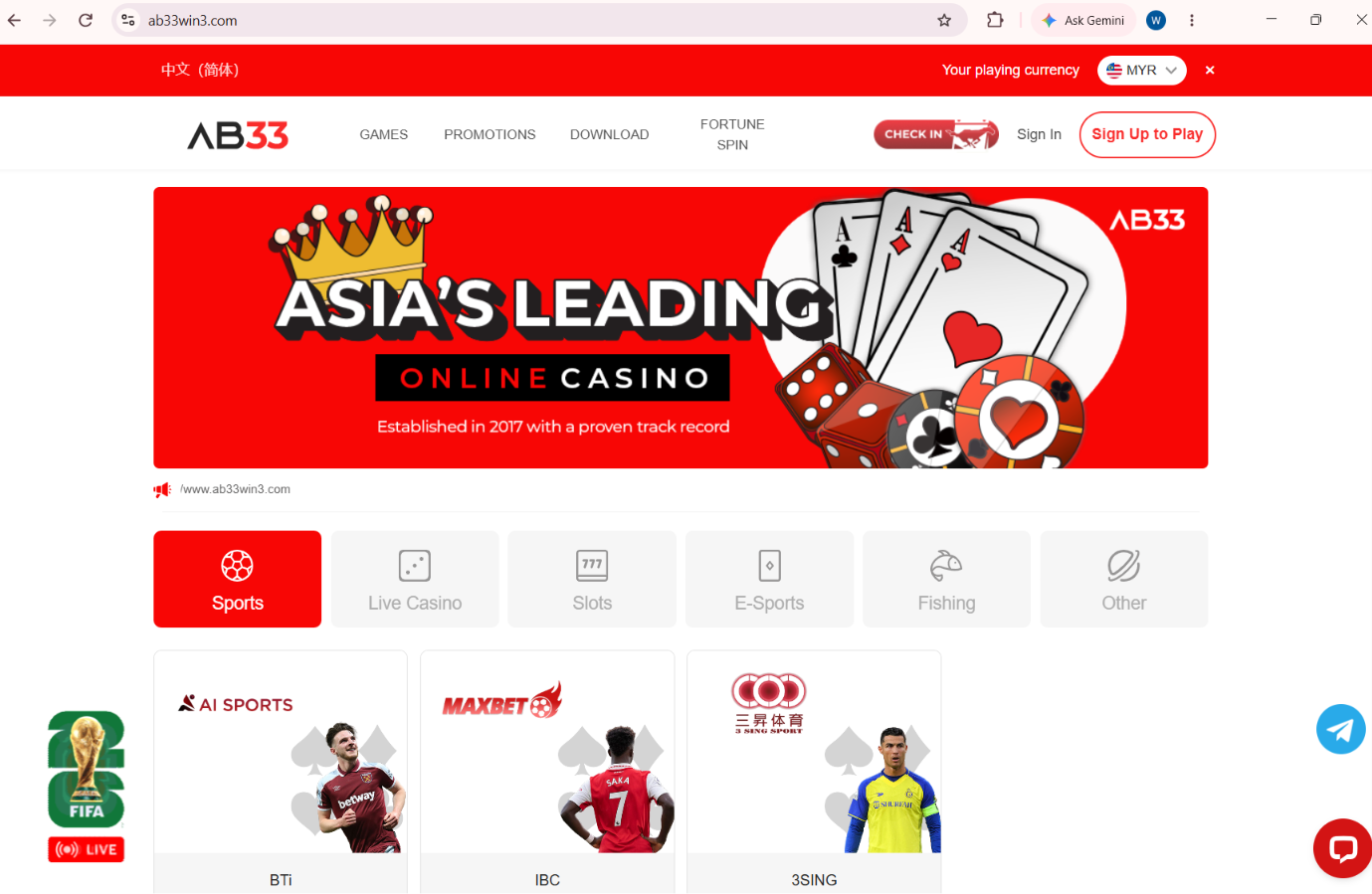
In the supplied desktop image, the header and the row of category tiles organise several possible next steps. The mobile reference presents its own account controls, category view and lower navigation. Compare the function of those elements first. An item moving to a menu does not, on its own, show that the service behind it was added or removed.
Account controls belong to a different journey
Sign-in and sign-up wording can sit near one another because returning members and new visitors arrive at the same homepage. Their intentions remain different. A person with an existing profile should identify the intended AB33 sign-in route rather than treat every prominent account button as interchangeable.
The screenshots establish where certain controls appeared in those captures. They do not show a successful login, account recovery or registration. If you need help, describe the actual page and the visible issue. Do not send a password or verification code merely to demonstrate which button you were trying to use.
More visible tiles do not mean more verified products
A wider page can fit category tiles and several labelled cards in the same frame. That makes the layout easier to survey, but it does not establish the complete catalogue. A phone may show fewer items simply because the visible area ends earlier. The two captures need to be compared as partial views.
Look for the category heading, any filter state and the page position before counting products. A screenshot taken above the fold cannot describe everything farther down. Equally, a tile’s presence is not proof that a particular account can launch every product behind it. The current product information answers a different question from the homepage arrangement.
Read mobile navigation in its own context
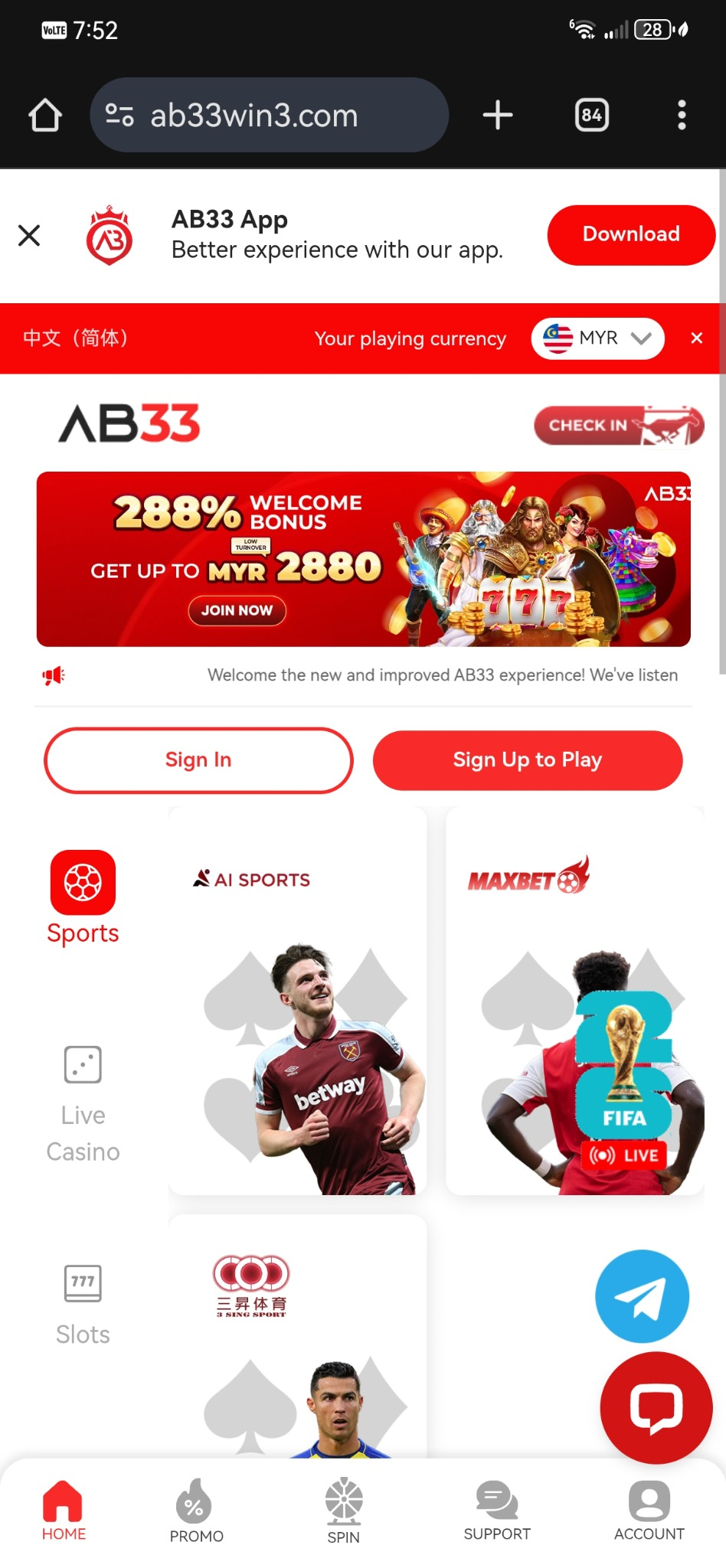
The retained mobile reference includes a lower navigation row. Such controls can offer a quick route between broad sections, while the main page continues to display its own cards. Identify which layer a button belongs to before describing it as a game, a provider or an account feature.
This is particularly helpful when sharing a cropped image with support. Keep enough of the heading and navigation visible to establish the section, while removing personal information. “The category row on the mobile homepage” is a clearer description than “the button has moved”. It tells the reader which interface element you mean without claiming a cause for the change.
A desktop comparison does not certify an app
A mobile-looking interface can be viewed in several ways. A screenshot alone does not identify the installation source, operating-system requirements or whether a particular native app was tested. Those details need their own evidence. Do not infer them simply because a layout is narrow or a download message is visible.
The address also deserves a separate check. Chromium’s explanation of browser connection indicators distinguishes an encrypted connection from proof that a website is trustworthy. A familiar layout and HTTPS are useful observations, but neither replaces an independent check of the destination being visited.
Keep offers and interface observations separate
If a comparison leads to a promotional question, use the AB33 promotions page and read the relevant conditions. A banner captured on one device is not evidence that an offer applies to another account, or that a later version of the page carries identical terms.
The useful conclusion is modest: the captures show how navigation and account entry were presented at those moments. They can help identify a route or explain a layout question. They cannot establish payout speed, current eligibility, licensing or guaranteed results. Those subjects should not be smuggled into a visual comparison.
Frequently asked questions
Does a different mobile layout mean a feature has disappeared?
Not necessarily. Check the section and current navigation before drawing that conclusion.
Do the screenshots prove a successful AB33 login?
No. They show captured interfaces, not a completed member session.
Can the mobile image certify an installation file?
No. Installation source and device requirements need separate checks.
Where should offer-specific questions be checked?
Use the relevant promotion’s complete terms rather than infer eligibility from a homepage banner.
Brand information: AB33.